


Exhibitfy

Discovery, redaction, Bates stamps & trial binders — without the cloud.

The whole production workflow on your own machine. Built by a trial lawyer, for solos and small firms. Your client's documents never leave your computer — no uploads, ever.

$199 a year per attorney — less for more seats.
21-day free trial. No credit card required. Exhibitfy Lite for iPhone included.
Start your free trial →
Chrome & Edge on desktop · iPhone & iPad via Exhibitfy Lite · works offline
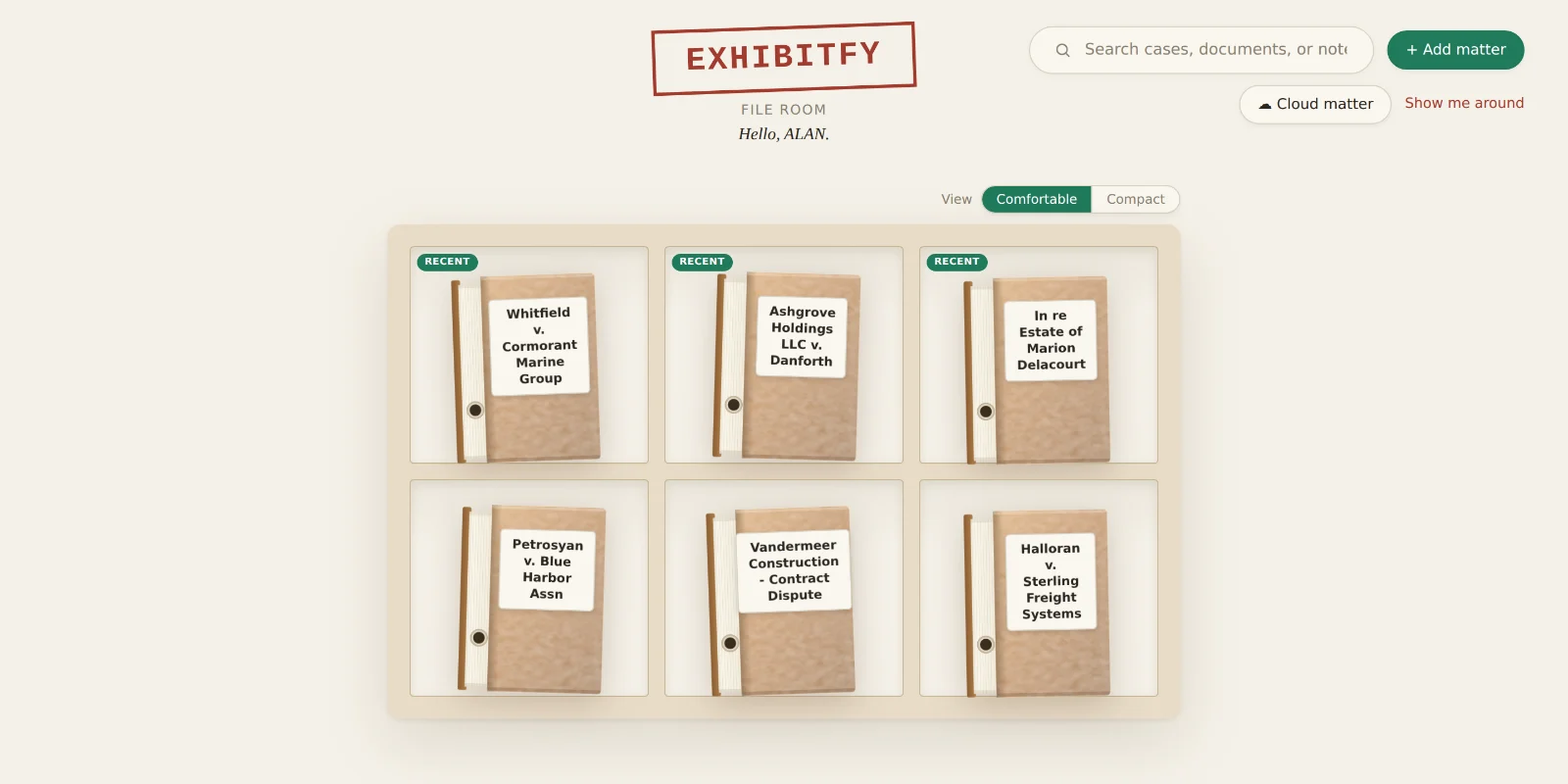
The Exhibitfy File Room: a shelf of matter folders, each one a real folder on the attorney's own disk.
The File Room. Every matter is a real folder on your own disk — not a record in someone's database.
What you actually get

A whole production, start to finish, on one machine.

Every screenshot below is the real application, running. The case is invented — the software is not.

Open a matter, and it opens like a file

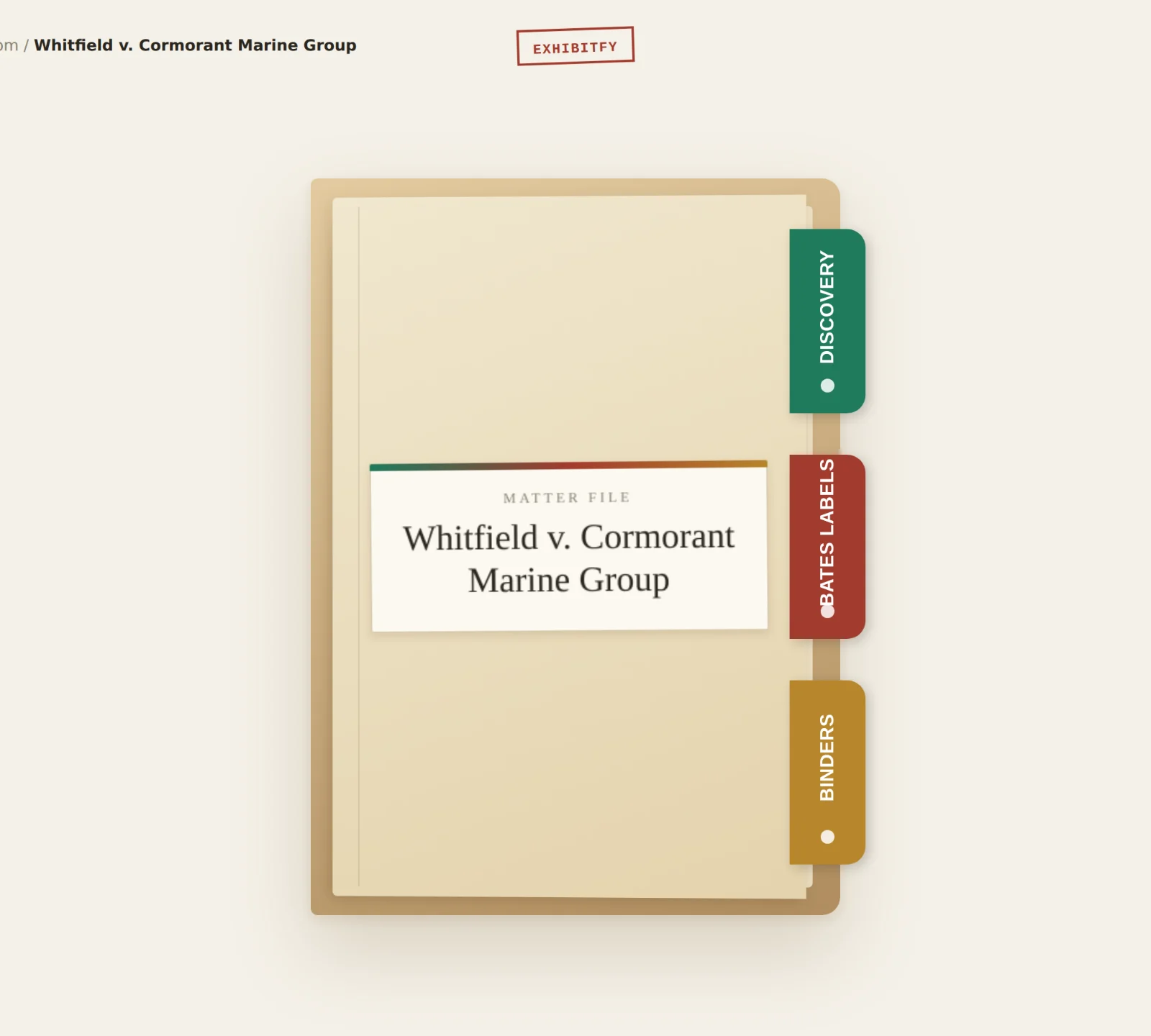
A matter is a classification folder with three tabs cut into its edge: Discovery, Bates Labels, Binders. No dashboards, no project boards, no learning a new metaphor for something you have done for twenty years.

Underneath, it is a plain folder — To Produce, Received, Bates Stamped, Binders. Delete Exhibitfy tomorrow and the matter is still a complete, readable record.

An open matter shown as a classification folder with three index tabs: Discovery, Bates Labels, and Binders.

Sort discovery the way you already sort paper

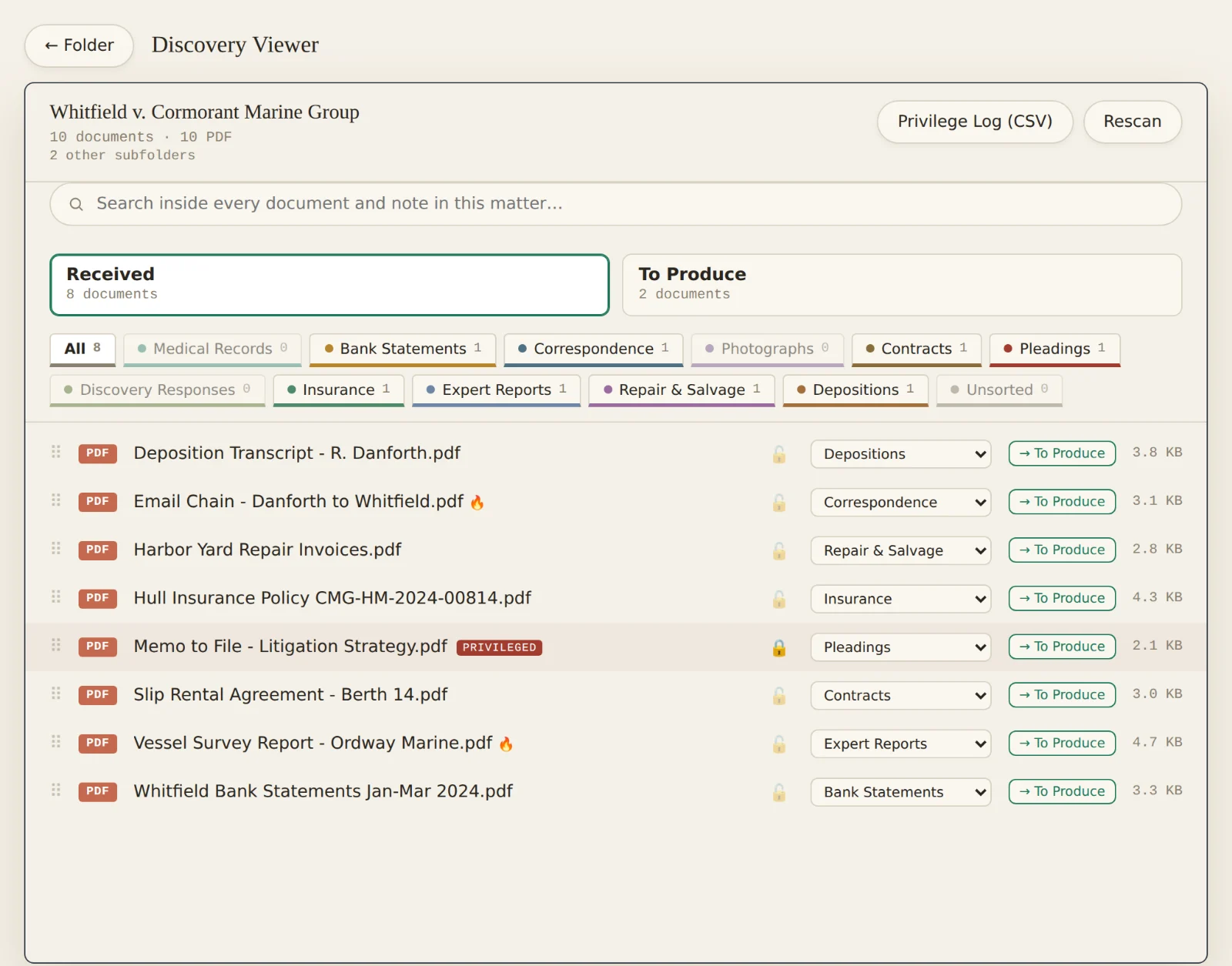
Documents land in Received and To Produce trays and file onto category tabs — the standard ones plus any you invent. Counts on every tab, so you can see what you have without opening anything.

Privileged documents carry a PRIVILEGED mark and are locked out of every production automatically. The privilege log builds itself as you work, and exports as a CSV.

Discovery Viewer listing documents across category tabs, with one document marked privileged.

Read, highlight, and keep your thinking attached

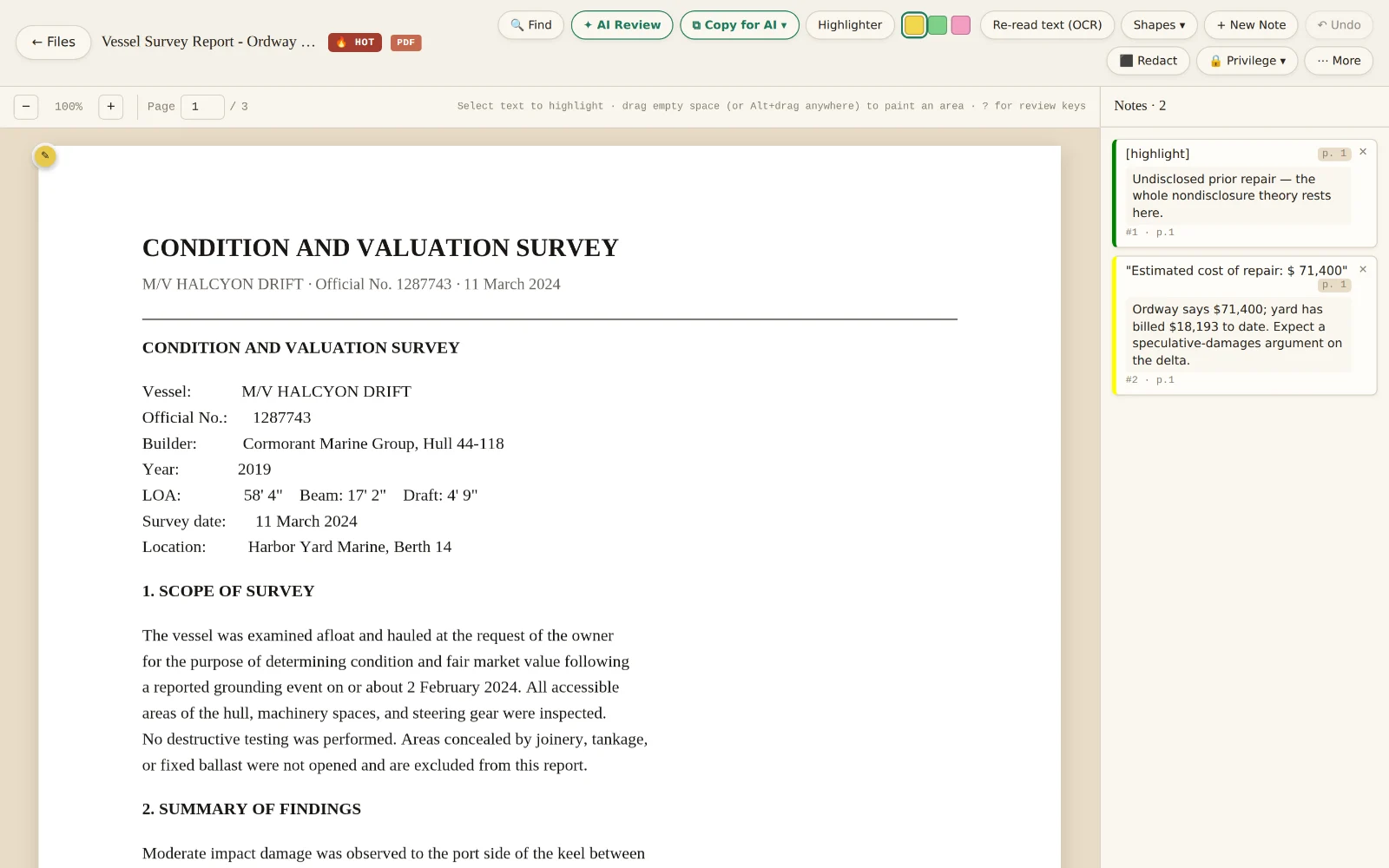
PDFs, Word, Excel, and photos open with real selectable text. Highlight a passage and the note stays pinned to it — with the page number, in the margin, where you left it.

Notes live in a small file inside the matter folder, so they travel with the case and never strand you inside one program.

A survey report open in Exhibitfy with two attorney notes pinned in the right-hand notes rail.

Find every account number in one pass

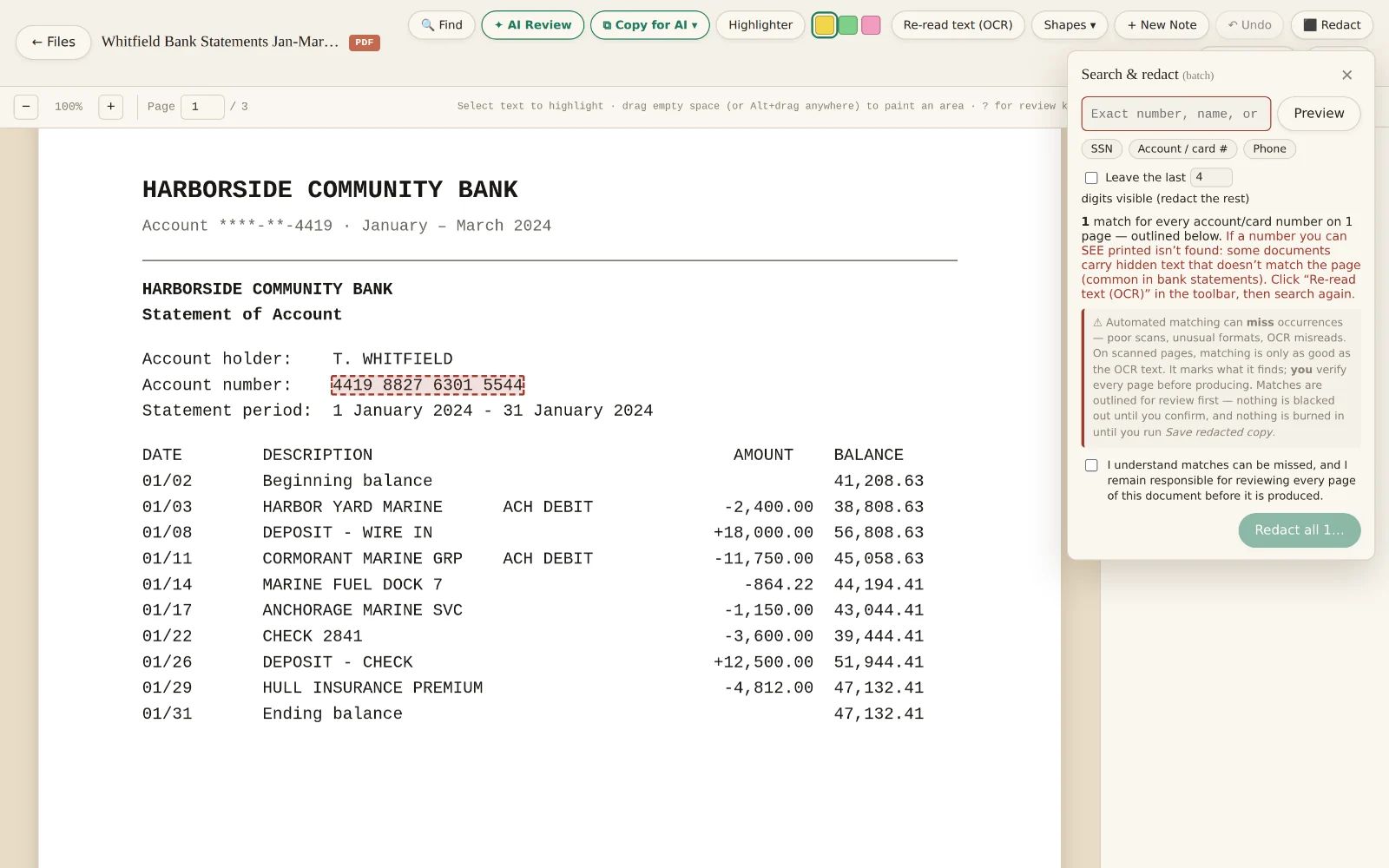
Search a phrase, or use a preset for SSNs, account and card numbers, or phone numbers. Matches are outlined for your review first — nothing is blacked out until you confirm it, and nothing is burned in until you save a redacted copy.

When you do, the redaction is burned into the page. There is no recoverable text hiding under the black box.

Search and redact finding an account number in a bank statement, outlined in red for review before redaction.

Bates-stamp a production in seconds

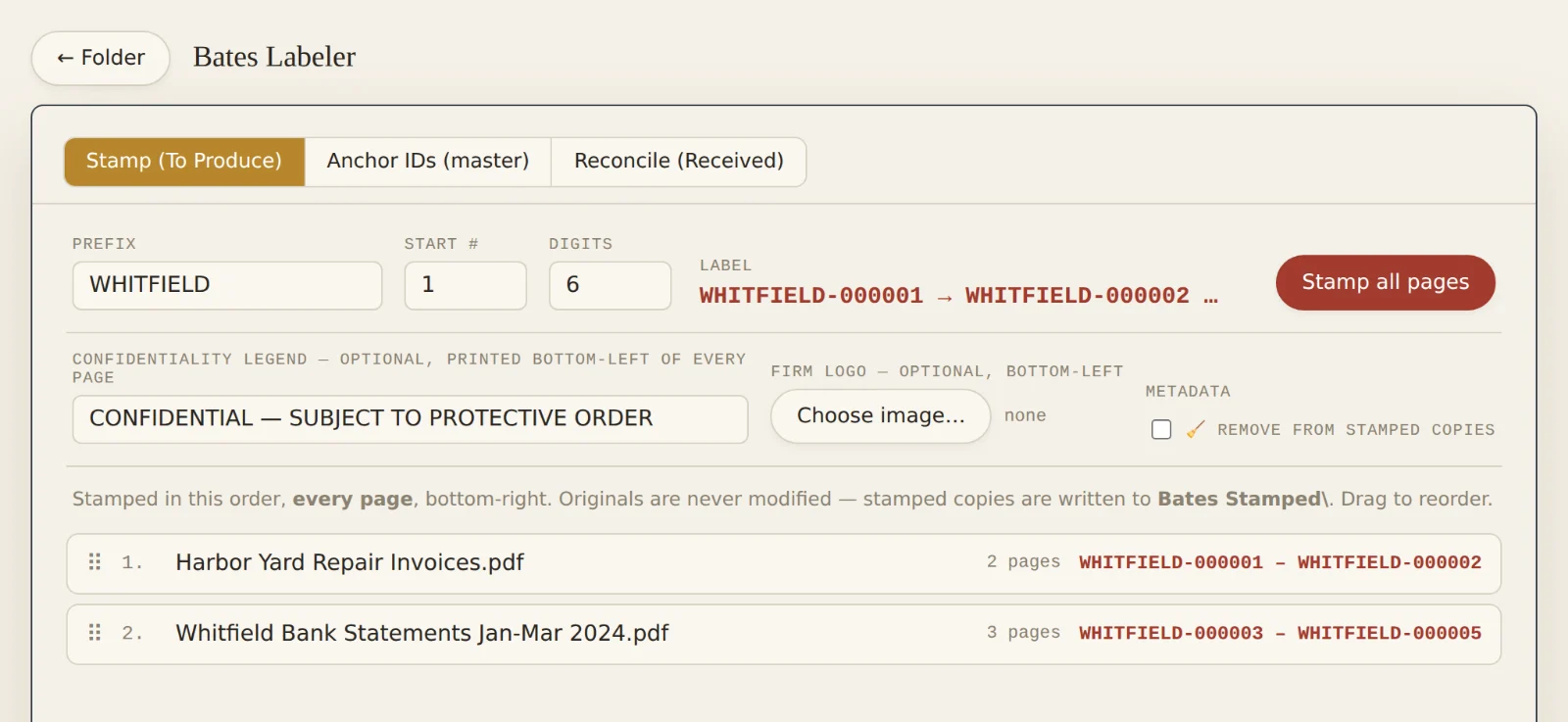
Prefix, start number, digits. Stamped on every page, bottom-right, with an optional confidentiality legend and your firm logo. Originals are never modified — stamped copies are written to a new Bates Stamped folder.

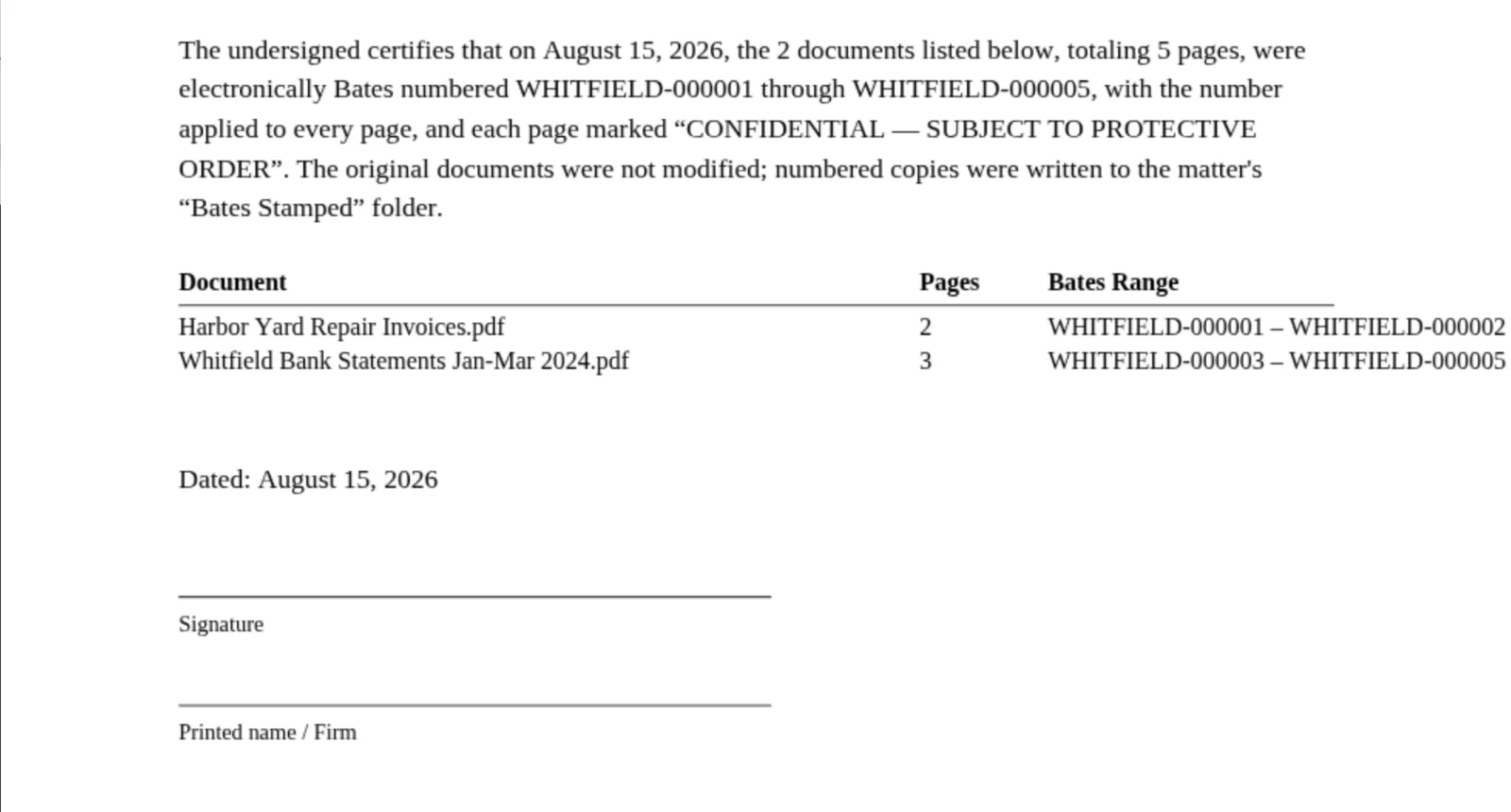
Every run produces a signable Certificate of Bates Numbering: what was numbered, how many pages, the exact ranges, and the date.

The Bates Labeler with a WHITFIELD prefix, showing the computed Bates range for each document.

And a certificate you can sign

Generated from the run itself, not typed up afterwards. The document list, page counts, and Bates ranges come straight out of what was actually stamped — which is exactly the point of having one.

A Certificate of Bates Numbering listing each document, its page count, and its Bates range, with a signature block.

Build the binder, exhibit by exhibit

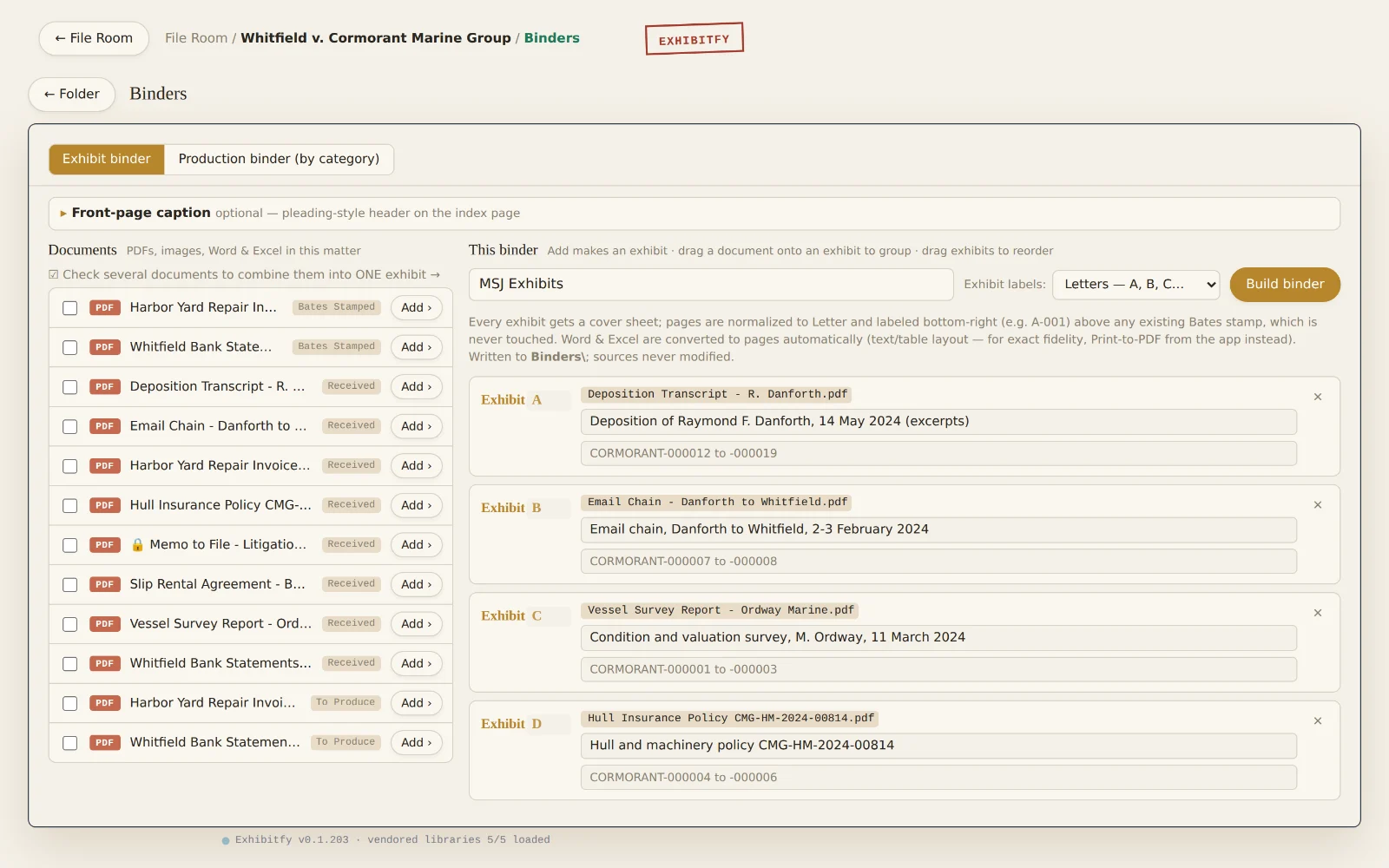
An exhibit is a group, not a file: combine as many documents as it takes — PDFs and photos together — into one continuous exhibit. Letters or numbers, your choice, per binder.

Every exhibit gets a cover sheet. Existing Bates stamps are never touched or re-stamped; the exhibit's own page label sits above them. The index is hyperlinked, with a pleading-style caption if you want one.

Privileged documents cannot be dragged into a production. That is structural, not a reminder you have to remember.

The binder builder with exhibits A through D, each with a description and Bates range.

And the whole thing fits in your pocket

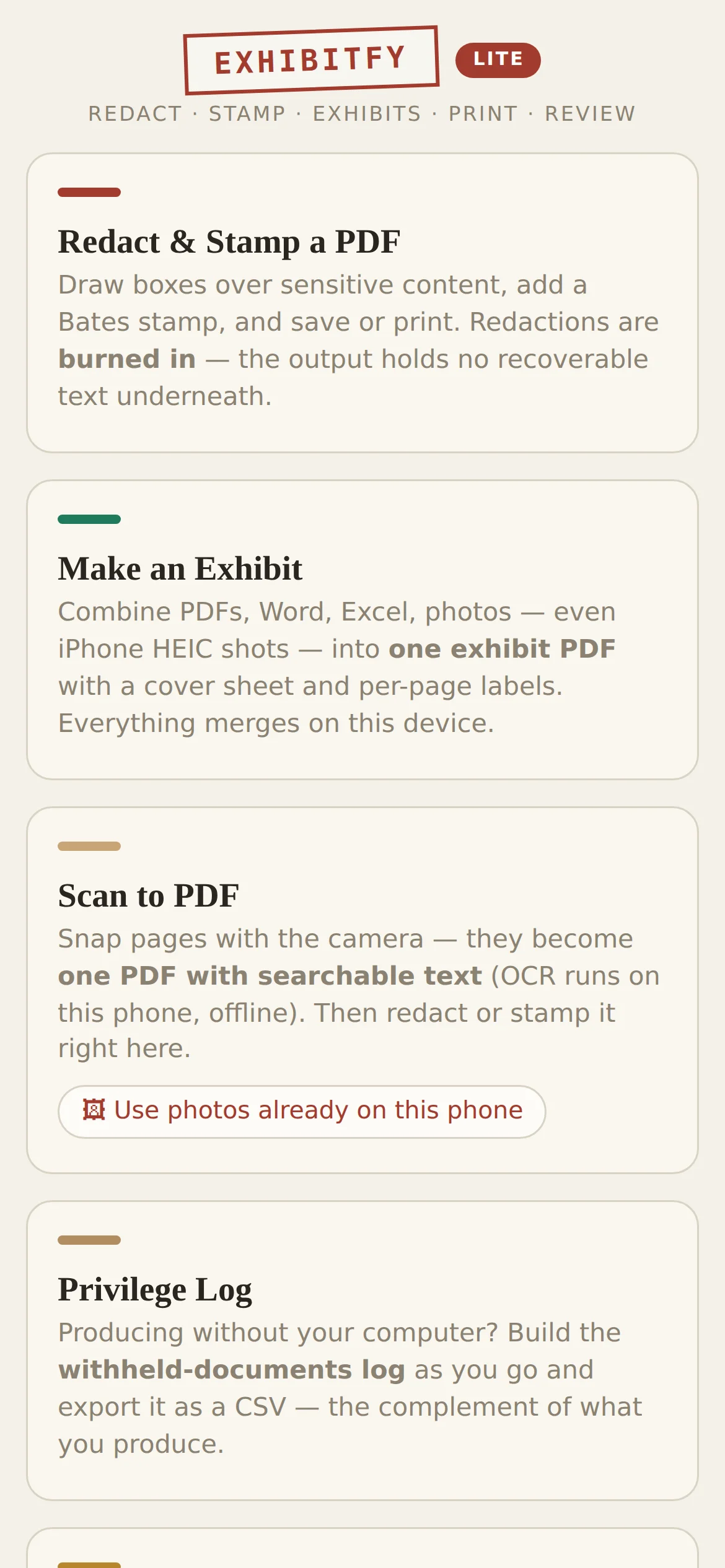
Exhibitfy Lite runs in Safari on an iPhone or iPad, and it is included with every seat. Scan pages to a searchable PDF with OCR that runs on the phone, redact, Bates-stamp, and combine files into a labeled exhibit — in the hallway, at the courthouse, with no signal.

It does not use up a device activation.

Exhibitfy Lite running on an iPhone, offering redact and stamp, make an exhibit, scan to PDF, and privilege log.
45-second demo

See it work.

Why it's different

No cloud. No uploads. Ever.

Your documents stay yours

Client files never leave your computer. Exhibitfy reads and writes a real folder on your own disk — no upload, no cloud, no server ever sees a document.

A matter is a real folder

Binders are real PDFs. Notes and categories live in a small file inside the matter folder. Delete the app and your records remain complete and readable.

Built for production

Bates stamping, exhibit and production binders with hyperlinked indexes, burned-in redactions, and a court-ready privilege log — all offline.

Pricing

Founding pricing, while it lasts.

One price, per attorney, per year. Everything is included — there is no tier that withholds redaction or binders until you pay more.

FOUNDING
Solo
$199 /yr
per attorney · list $299
One attorney. The whole toolkit, plus one staff seat included.
Small firm
$149 /yr
per attorney, 2–4 seats · list $229
Each attorney brings a staff seat with them.
Firm
$119 /yr
per attorney, 5+ seats · list $179
Same software, same guarantees, lower per-seat cost.
Free trial 21 days, no credit card required. Everything switched on. If you do nothing at the end, it simply stops — your matter folders stay exactly where they are, readable without Exhibitfy.
Staff seats $69/year each. The first staff seat per attorney is included at no charge. Up to four staff seats per attorney seat.
Exhibitfy Lite Included with every seat, at no extra cost. It does not consume a device activation.
Devices Each seat activates on two machines — the office desktop and the laptop that goes to court.
Founding price Locked for as long as you keep renewing. List pricing is $299 / $229 / $179 and takes effect for new customers later.
Start your free trial → Ask about firm seats
Start now

Your key arrives in about a minute.

Twenty-one days, everything switched on, no credit card required. Nothing you type here involves a client document — a name, an email, and your firm is all this server ever sees.

Chrome or Edge on desktop.
No credit card, no auto-renewal, nothing to cancel.
Before you ask

The questions everyone asks.

Where do my documents actually go?

Nowhere. Exhibitfy reads and writes a folder you choose on your own computer, through the browser's file-access API. No document content is uploaded, cached on a server, or processed anywhere but your machine — including by us. The only thing this site's server ever knows about you is the name, email, and firm you typed above.

Why only Chrome and Edge?

Because the file-access API that makes the whole no-cloud promise possible does not exist in Safari or Firefox. This is a real limitation, not an oversight — and it is the price of never uploading anything. On iPhone and iPad, Exhibitfy Lite runs in Safari and covers the courthouse work.

What happens when the trial ends?

The program stops opening. Your matters do not: every folder, every stamped PDF, every binder, and the small notes file are ordinary items on your disk that you can open without Exhibitfy, during the trial and forever after. A licensing question can never make your files unreadable.

Does it need an internet connection?

Once, to activate. After that it works offline indefinitely — on a plane, in a basement records room, on courthouse wifi that does not deserve the name. It re-checks the license quietly whenever it happens to be online.

Will it re-stamp Bates numbers I already have?

No. Existing Bates stamps are never touched, moved, or overwritten. When a document goes into a binder, the exhibit's own page label is placed above the existing stamp, never on top of it.

I have more than four staff for one attorney.

Then email us and we will work it out like people. The four-per-attorney cap is there to keep one seat from quietly becoming a firm-wide license, not to catch anyone out.

Coffee break

Bates & Destroy — the Exhibitfy game.

A two-minute fever dream about document production: chase the paperwork down, stamp everything, and survive opposing counsel. Plays right in your browser — phone included. Built with the same obsession as the app, for considerably lower stakes.

Play the game →